As a project continues, its messages tend to spread across work groups, temporary chats and direct messages. A requirement was discussed, a file was sent and a problem was debated. Days later, the team remembers the conversation but cannot quickly return to the working context.
The problem is not a lack of communication. It is a separation between communication and the project. A chat app helps one person reach another. Enterprise project collaboration must also show which project a message belongs to, who may work with the material and how an AI-generated answer enters team review.
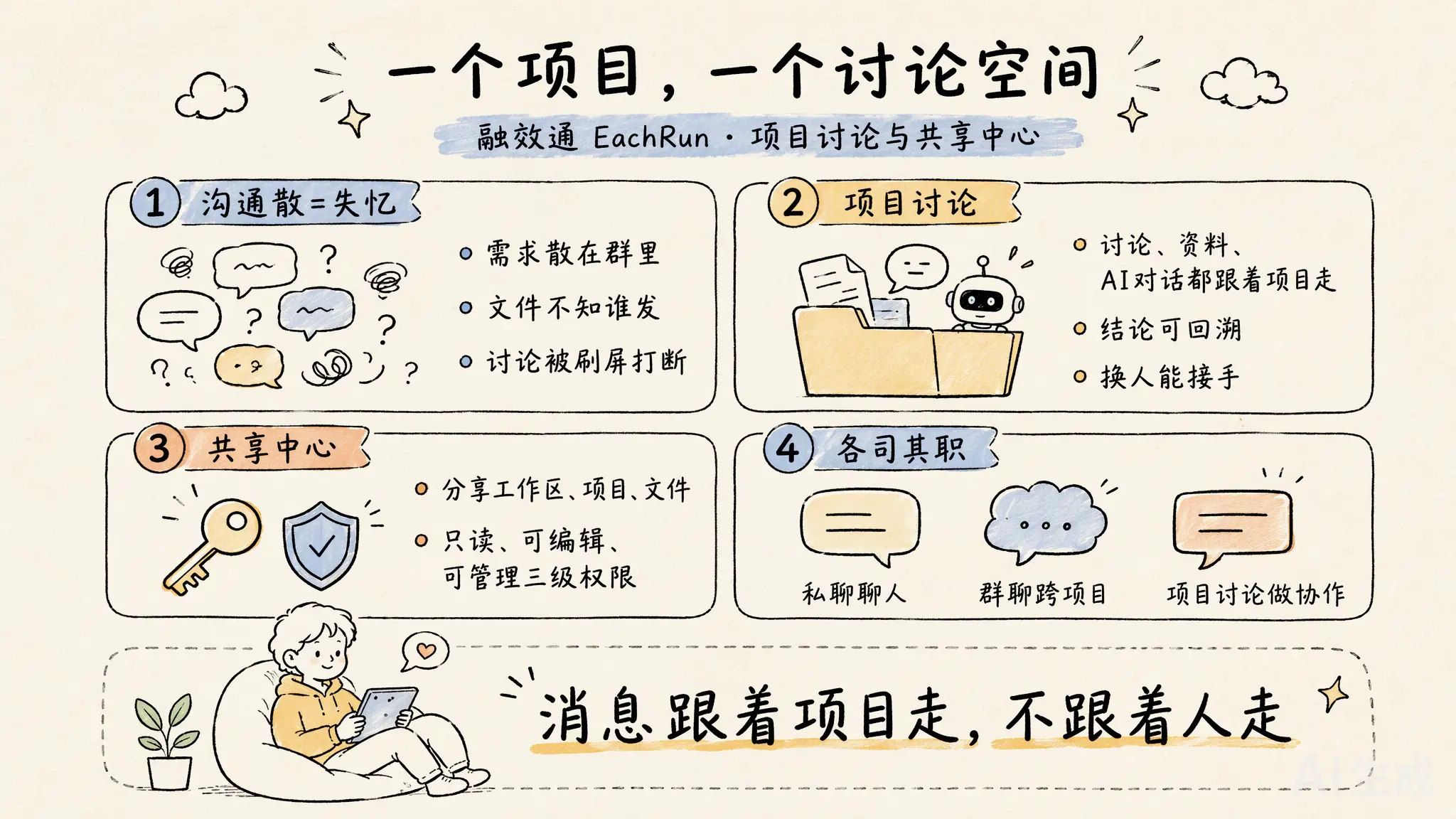
Why team communication loses project context
General chat tools organize messages around people and groups. Projects are organized around tasks, materials, participants and a sequence of decisions. Those are different structures. When one employee joins several projects, a single work chat can jump between customers, systems and stages.
Three practical problems follow. Messages from different projects mix together. Discussions and materials live in separate places. A member can read a message without being able to open the project it refers to. As message volume grows, rebuilding context takes more time.
EachRun still supports direct messages and regular group chats. Direct messages serve person-to-person communication. Group chats serve conversations that are not tied to one project. When an issue belongs to a specific project, the discussion should return to that project.
Project discussions: one discussion space for one project
After a project is shared with a collaborator through the sharing center, it appears automatically in that person's message list. Every collaborator in the project can see its project discussions and join a topic.
A project discussion supports text messages, quoting and replies. Other members receive new-message notifications. When someone needs the tasks or materials, they can open the related project from the discussion instead of leaving the conversation and searching through another interface.
Topics can also separate different issues. Product improvements, usage feedback and data isolation do not have to compete in one continuous message stream. The purpose is not to add another chat mode. It is to give each discussion a clear project owner.
The sharing center connects workspaces, projects, files and roles
Once communication returns to the project, materials need to follow the same collaboration relationship. The EachRun sharing center currently supports three types of share: an entire workspace, a single project and a single file.
Three access roles are available:
- Read-only: the recipient can view the shared material.
- Editable: the recipient can work on and change the shared material.
- Manageable: the recipient can carry out the corresponding management work.
A share therefore identifies the object, the collaborator and the working role at the same time. See the EachRun product scope for the wider workspace and the core value of the enterprise AI workspace for the management principles behind it.
Start from an AI answer and continue with team judgment
AI introduces another collaboration problem. One employee obtains an answer, but the rest of the team still needs to see it, add context and decide whether it fits the project. Copying the result into an external chat separates the AI conversation from the work again.
In EachRun, a user can start a discussion from an AI answer and bring the relevant content into the project discussion. Every project collaborator can see it and continue the conversation around that answer.
AI supplies a result or a line of reasoning. The team supplies judgment, context and agreement. Enterprise AI creates more value when a useful answer enters a shared working process instead of remaining with one employee.
A real example: two developers working on an embedded notebook
Two developers worked together on an embedded notebook application for a development platform. After the project was shared through the sharing center, they used its project discussion to talk about product improvements, data isolation and functional problems found during use.
The conversation stayed with the project rather than spreading across temporary groups and separate tools. The developers could continue with the project context in view and resolve the usage issues through discussion.
This was a two-person project, not a large department. That is precisely why the example matters. A clear boundary for materials and discussion is useful as soon as two people share responsibility for the same work.
To validate this model in real work, start with a project that has clear participants, a defined material boundary and an outcome the team can check. An enterprise AI pilot can test that workflow before a wider rollout.
Frequently asked questions
How is a project discussion different from a regular group chat?
A regular group chat works for conversations that span projects. A project discussion is tied to one specific project. Every project collaborator can see and join the discussion, and members can open the related project directly from it.
What can the sharing center share, and which roles are available?
The sharing center currently supports an entire workspace, a single project or a single file. A share can grant read-only, editable or manageable access.
How does an AI answer enter team collaboration?
A user can start a discussion from an AI answer and bring the relevant content into the project discussion. Project collaborators can then add context, assess the answer and reply.
Validate collaboration with one real project
Choose a project with clear participants and a defined material boundary. We will help confirm sharing roles, project discussions and the AI collaboration workflow.
Apply for an enterprise pilot